참고
https://docs.spring.io/spring-boot/docs/2.2.0.RELEASE/reference/html/howto.html#howto-data-access
“How-to” Guides
Spring Boot has no mandatory logging dependency, except for the Commons Logging API, which is typically provided by Spring Framework’s spring-jcl module. To use Logback, you need to include it and spring-jcl on the classpath. The simplest way to do that
docs.spring.io
PropertySource (Spring Framework 5.3.6 API)
Annotation providing a convenient and declarative mechanism for adding a PropertySource to Spring's Environment. To be used in conjunction with @Configuration classes. Example usage Given a file app.properties containing the key/value pair testbean.name=my
docs.spring.io
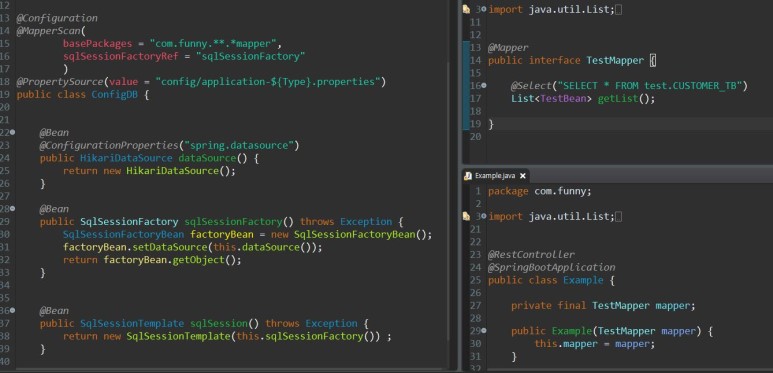
스프링 부트에서 커넥션 디비 풀 자바클래스로 구성
application.properties ( 연결정보 작성 )
spring.datasource.driverClassName=
spring.datasource.jdbcUrl=
spring.datasource.username=
spring.datasource.password=
@Mapperscan 과 @Mapper 기본 기능은 동일 목적에 따라 선택 사용
@ConfigurationProperties가 프로퍼티 파일의 디비연결 정보를 HikariDataSource에 자동 주입함
디비 연결 정보가 여러개일 경우 해당 프로퍼티 파일을 선택적으로 읽어 오기 위해 @PropertySource 지정하였으나 방식 변경으로 불필요 application-{value}.properties 형식으로 프로퍼티 파일 추가 후 spring.profiles.active={value} 또는 vm argument( -Dspring.profiles.active={value} ) 해당 프로퍼티 벨류 값 을 설정시 활성화 되며 application.properties(기본)와 다중설정이 가능
'java' 카테고리의 다른 글
| Spring boot Xss filter java config (0) | 2021.04.27 |
|---|---|
| Spring Boot Log4j2 java config (0) | 2021.04.23 |
| Spring Boot Log4j2 기본설정 (0) | 2021.04.22 |
| Spring Boot Security Java Config (0) | 2021.04.22 |
| spring security 서버를 리붓 하지 않고 사용자 로그아웃 (0) | 2021.04.22 |


